Collection Studio 3.59

[ Datum: August 12, 2010 ]


Interface Languages

gehen


Every author of a new Language File gets
a free license for Collection Studio!

Overview

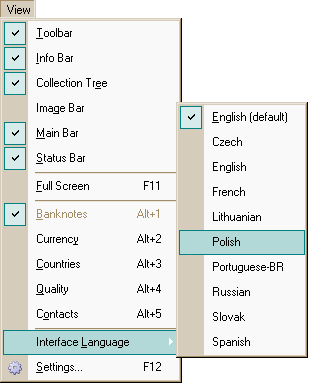
Menu View: select interface language in Collection Studio The multi-language interface of Collection Studio has become available from version 2.40. English is the default language, and an unlimited number of other languages may be added.

Collection Studio uses Language Files (*.lng - files). These files (English.lng, French.lng, Russian.lng, ...) are situated in directory where the program has been installed. It is text files containing strings with user's interface in different languages. For translating any special knowledge isn't needed. That's why you can translate lng-file into your native language and use it with Collection Studio.

How to translate LNG files?

We are very grateful you for your interest in our software translation.

The LNG file is rather a big file. Its volume is above 15 Kbytes. So from the first sight it might to be hard to translate it. But it's wrong. Approximately half of the information in LNG file should be NOT translated to make our program understand which string is should be used for particular situation!

For creating a new lng-file, or editing an old one you can use any file editor, for example NotePad.

Follow the rules, and you'll understand that it's easy:

  • Do not translate strings in the square brackets ([]).
  • Do not translate strings before the first '=' sign.
  • Do not remove or append any new special sub-strings (for example '%%', '%d', '%2d', '%s', '\n', '\t' and etc).
  • Do not translate strings after '#' sign - it is comments for editor.
  • Translate only words and phrases in each file-line starting after the first '=' sign.
  • (optional) Place the '&' sign in the strings to have a possibility to reach a menu item using the Alt key.
  • Try to keep original length of the string. It means that you shouldn't do it if translated string is 3 or 4 times larger than original.
  • Save the file as 'YourLanguage.lng' in the same folder as Collection Studio.
  • After translating check you lng-file using the program. To do this, select your language in the program in Main Menu: View > Interface Language and verify that all strings are translated and their length is acceptable.
  • If you wish, you can write down an lng-file information in the first section (Description): name of the language, version, date when the last changes were made, your name and your e-mail address. If you provide us an URL with your home page, it will be placed on this page (in Collection Studio Help File, and on our web-site in the section "Online Collection Studio Help File").
  • If you made several changes in currently selected lng file in CS, you should restart the application in order the changes take effect.

Example

String 'AAA' - is an original string (in the base language);
String 'BBB' - is a translated string;

Source part of the lng-file:

# AAA
[AAA]
AAA=&AAA
AAA=AAA %d &AAA

Translated this part should be:

# AAA
[AAA]
AAA=&BBB
AAA=BBB %d B&BB

Statistics View

Current translation of the main statistics view is done using additional language file. It is placed in the sub folder "Stats" with corresponding filename. So, for example, if you set Collection Studio Interface language as poland (Poland.lng) the Poland.htm will be used for statistics. If no such file, English.htm (default one) will be used.

Translations

Collection Studio Interface Transaltions
Language Collection Studio
Version
Last changed Download from
collectionstudio.com
Translated by
belarussian flag Belarussian 3.57March 10, 2010 download  download Igor Petrenko
Belgium flag Flemish (Belgium) 3.55October 17, 2009 download  download Rudy Matton Open link in new window
czech flag Czech 2.47July 31, 2008 download  download Jaroslav Minar
Flag of Netherlands Dutch 3.54Juni 19, 2009 download  download J.van Mourik Open link in new window
flag of Germany German 3.57March 22, 2010 download  downloadFrank Winger Open link in new window
english flag English 3.57March 5, 2010 download  downloadS&S Royal Limited
french flag French 2.47July 31, 2008 download  downloadChristian Seruzier
Flag of Hungary Hungarian 3.50November 27, 2008 download  downloadMr. Peter Palla
Italian flag Italian 3.55August 4, 2009 download  downloadDe Profundis Rebecchino
Lithuanian flag Lithuanian 3.57March 7, 2010 download  downloadLaurius Vaitkevicius Open link in new window
Flag of Norway Norwegian 3.49January 13, 2009 download  downloadRenate Gulbrandsen
polish flag Polish 3.50November 18, 2008 download  downloadDuszkiewicz Krzysztof
portuguese flag Portuguese 3.48July 31, 2008 download  downloadAntonio Mendona
brazil flag Portuguese (Brasil) * 3.51January 4, 2009 download  downloadRodrigo Spano
romanian flag Romanian 2.47July 31, 2008 download  downloadCatalin Stefan Open link in new window
russian flag Russian 3.57March 5, 2010 download  downloadS&S Royal Limited
slovak flag Slovak 2.47July 31, 2008 download  downloadJaroslav Minar
spanish flag Spanish 2.47July 31, 2008 download  downloadRui Costa
Flag of Turkey Turkish 3.50August 8, 2008 download  downloadAli Koc Open link in new window
Flag of Ukraine Ukrainian 3.56February 15, 2010 download  downloadnetavek

* - About the terminology Portuguese-BR, it is because, there should be also Portuguese-PT, which stands for Portuguese from Portugal. Both languages have most of words with the same writting and meaning but, some of them are different. For example, 'File' is 'Arquivo' in Brazil and 'Ficheiro' in Portugal.


Inhaltsverzeichnis


S AND S Royal Limited
Email:
Work:
Moldova