| |
 Русский
 Deutsch
 English
 Italian
 Polish
Collection Studio 4.76[ последний релиз: 31 мая 2024 ] |
| |
Collection Studio 4.76[ последний релиз: 31 мая 2024 ] |
|
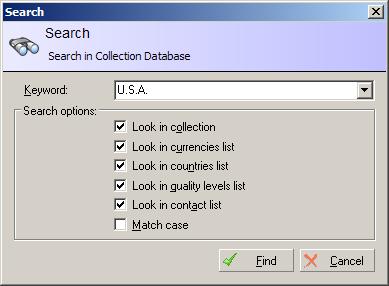
| Tool "Find"
The "Search" window provides various Collection Studio possibilities to find out appropriate items in your collection.
Advanced search optionsClearing search historyIn order to clear search history you should specify "-clear-history" command (without quotes) in the Keyword field and press Find button. System settingsIn spite of using "Settings" window, you can apply the following additional settings to setup CollectionStudio. These settings can be set only using RegEdit standard Windows® application for the following section in registry: HKEY_CURRENT_USER\Software\CollectionStudio.com\Collection Studio\
Show complete list of system settings available in CollectionStudio. Other tools |
Copyright © 2004 - 2018, K.S.U.O. Все права защищены.
Использование данного сайта означает согласие с условиями указанными в секции "Пользовательское соглашение".
Веб-хостинг от SG Managed.